
How one record becomes your books, tax and financial statements
Follow one sale and one supplier bill through PXL Books: the journal entry, the books of accounts, VAT, withholding, BIR forms and the financial statements.
On this page
In PXL Books you record a transaction once, from its source document. The software writes the journal entry, puts it in the right book of accounts, carries it to your VAT and withholding figures, fills the BIR forms that use it, and updates your financial statements. You review the result instead of encoding the same sale in four places.
This page follows two records through the system: a sale and a supplier bill.
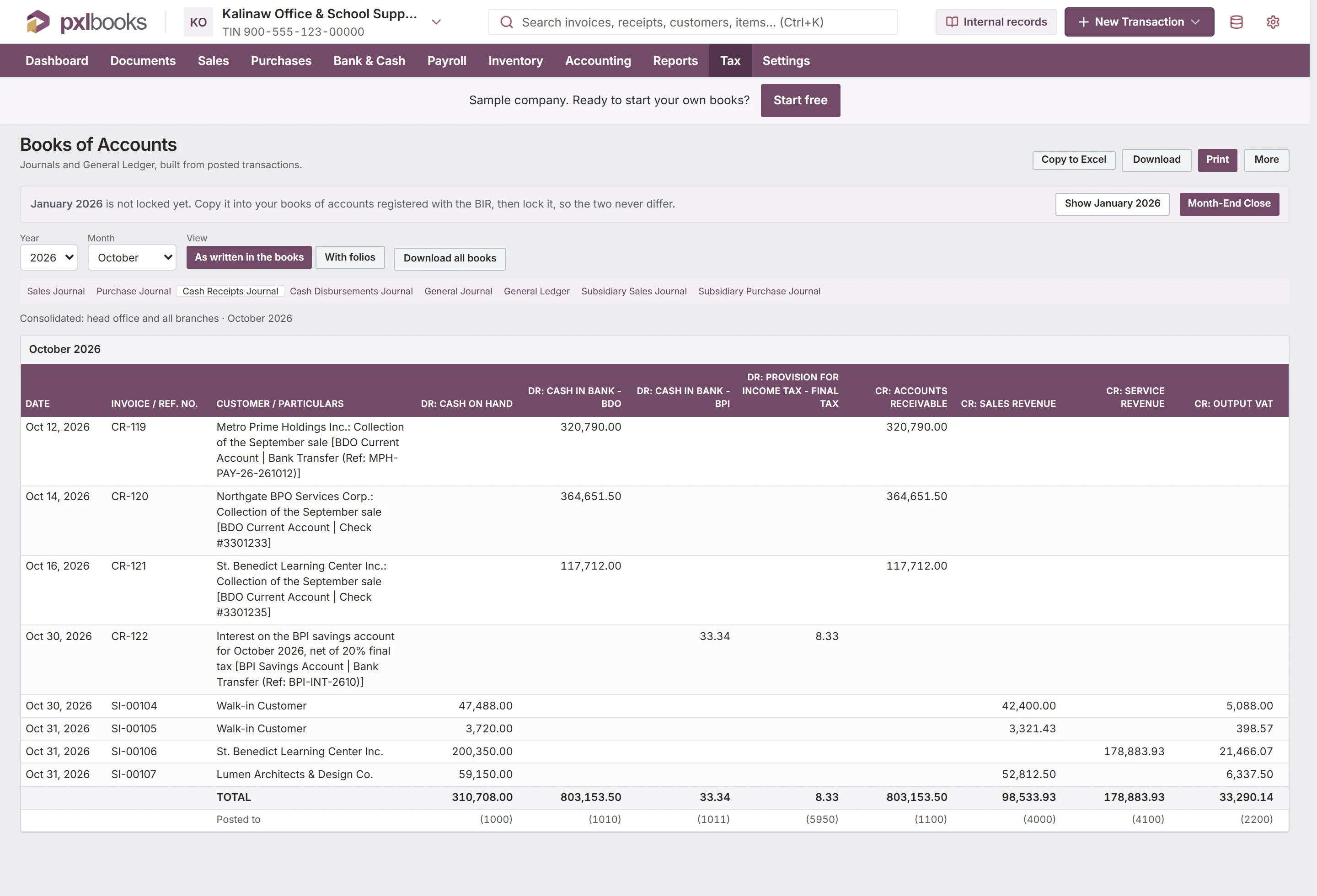
Demo records shown for illustration. Open the matching demo workflow to inspect the sample data.
Why this matters
In a manual or spreadsheet setup, one sale is usually encoded several times: in the sales book, in the ledger, in the list of receivables and in the VAT working paper. Every extra encoding is a chance for the figures to disagree. In double-entry software, the sale is entered once and every book and report reads from that single entry, so they agree by design.
Record 1: a sale
Say your business issues Sales Invoice No. 0151 from its registered booklet for services billed on account.
1. You record the invoice. In PXL Books you open Sales → Sales Invoices → New, pick the customer, enter the invoice number from the booklet, the date and the lines. The tax code on each line (VAT, zero-rated, exempt, or non-VAT) tells PXL Books how to treat it.
2. Posting writes the journal entry. After any required approval, a VAT sale on account posts:
| Account | Debit | Credit |
|---|---|---|
| Accounts Receivable | ₱11,200 | |
| Sales / Service Income | ₱10,000 | |
| Output VAT | ₱1,200 |
A cash sale debits Cash on Hand instead of Accounts Receivable. A non-VAT sale has no Output VAT line; its percentage tax is computed for Form 2551Q.
3. The entry goes into your books of accounts. A sale on account appears in the Sales Journal, or in the General Journal for a Non-VAT business, which keeps no Sales Journal; a cash sale in the Cash Receipts Journal. Both post to the General Ledger. For a VAT taxpayer, the sale also appears in the subsidiary sales journal with the buyer's TIN. Each line keeps its folio, so the books can be traced to the entry and back.
4. It reaches your tax figures. The output VAT flows into the quarterly VAT return (2550Q) and the Summary List of Sales. For a non-VAT taxpayer, the sale flows into 2551Q, or into the 8% computation on 1701Q if the business chose that option.
5. It reaches your financial statements. The sale is in revenue on the Statement of Income; the receivable is in current assets on the Statement of Financial Position. When the customer pays, you record the collection, and the receivable closes.
Record 2: a supplier bill with withholding
Say a VAT-registered supplier bills ₱22,400 for rent: ₱20,000 rent plus ₱2,400 VAT. Assuming an applicable 5% rental EWT code (WC100 for a corporate payee), the withholding is ₱1,000 and the supplier receives ₱21,400. Eligibility and the ATC still need review.
1. You record the bill. In Purchases → Supplier Bills → New, pick the supplier, enter their invoice number, the date and the lines. The tax code sets the input VAT, and the withholding code (ATC) sets the expanded withholding tax.
2. PXL Books writes the journal entry.
| Account | Debit | Credit |
|---|---|---|
| Rent Expense | ₱20,000 | |
| Input VAT | ₱2,400 | |
| Accounts Payable | ₱21,400 | |
| Expanded Withholding Tax Payable | ₱1,000 |
3. The entry goes into your books. A bill on account appears in the Purchase Journal, or in the General Journal for a Non-VAT business; a bill paid in cash or by check, in the Cash Disbursements Journal. For a VAT taxpayer it also appears in the subsidiary purchase journal.
4. It reaches your tax figures and forms.
- The withholding appears on the monthly remittance (0619-E) and the quarterly return (1601-EQ) with its Quarterly Alphalist of Payees (QAP).
- The supplier's BIR Form 2307 is filled from the bill: the payee, the ATC, the income payment for each month of the quarter and the tax withheld. See BIR Form 2307 for many suppliers.
- For a VAT taxpayer, the input VAT flows into 2550Q and the Summary List of Purchases.
5. It reaches your financial statements. The expense is in operating expenses; the payable and the tax withheld are in current liabilities until you pay them.
What you still do
- Check the source document. PXL Books records what you enter. The invoice and the bill are the evidence.
- Review the books and the forms before you file. Supported returns have Excel working papers that shows where each figure came from.
- File and pay. PXL Books fills the form; you file it in eFPS or eBIRForms and pay.
- Run month-end entries yourself. Depreciation and amortization post only when you run them, so nothing appears in your books without your say.
How to check that it ties
- The Trial Balance must show equal debits and credits.
- The total of each journal for a month agrees with what it posted to the General Ledger.
- From a supported amount in a report, open Transaction Detail to see the entries behind it, then open the entry itself.
- Every record keeps its first values and later changes in System Notes.
Try it
In the sales-entry demo, record one sale, then open the Sales Journal, the General Ledger, the VAT return and the financial statements. The same amount is in each.
Review the chain
For the ₱11,200 illustrative sale above, the revenue line is ₱10,000 and output VAT is ₱1,200. The customer receivable is ₱11,200 until settled. Inspect the posting, journal, tax working paper and statement under the same business, branch and period.
Questions
Does record once mean no review?
No. Review source evidence and the generated posting and outputs.
Do all records immediately affect the ledger?
Drafts and staff submissions awaiting approval are excluded until posted.
Why do books and tax reports differ sometimes?
Different date filters, tax treatments, adjustments and timing can change presentation. Reconcile rather than forcing equal totals.
Where do I investigate a surprising balance?
Open a supported report amount, then Transaction Detail, the source record and its System Notes.
Explore the full workflow
- Bank reconciliation and rules
- Payroll, contributions and year-end and employee self-service
- FIFO, weighted average and branch inventory
- Fixed assets and amortization
- Multi-branch accounting
- Reports, drill-downs and Excel
- Month-end close and year-end checklist
- 8% versus graduated income tax and corporate income tax
- Sworn declarations, DAT files and final withholding
- Senior citizen, PWD and athlete discounts
- Roles, approvals and data ownership and starting mid-year
- Books registration and soft-copy preparation
- Bookkeeper and CPA workflows, comparison checklist and CPA editorial policy
Related
- What PXL Books is (and is not)
- Books of accounts a small business keeps
- Recording sales from your invoice booklet
- Glossary
Last checked against the app: November 22, 2026.