
Bank reconciliation and bank rules
Import a bank statement, check running balances, match entries, review bank rules and export reconciliation working papers.
On this page
Bank reconciliation compares a bank statement with cash recorded in the ledger. PXL Books imports CSV or Excel statement lines, suggests matches, checks running balances and prepares summary and detail exports. A matching ending balance alone does not prove that every transaction is correct.
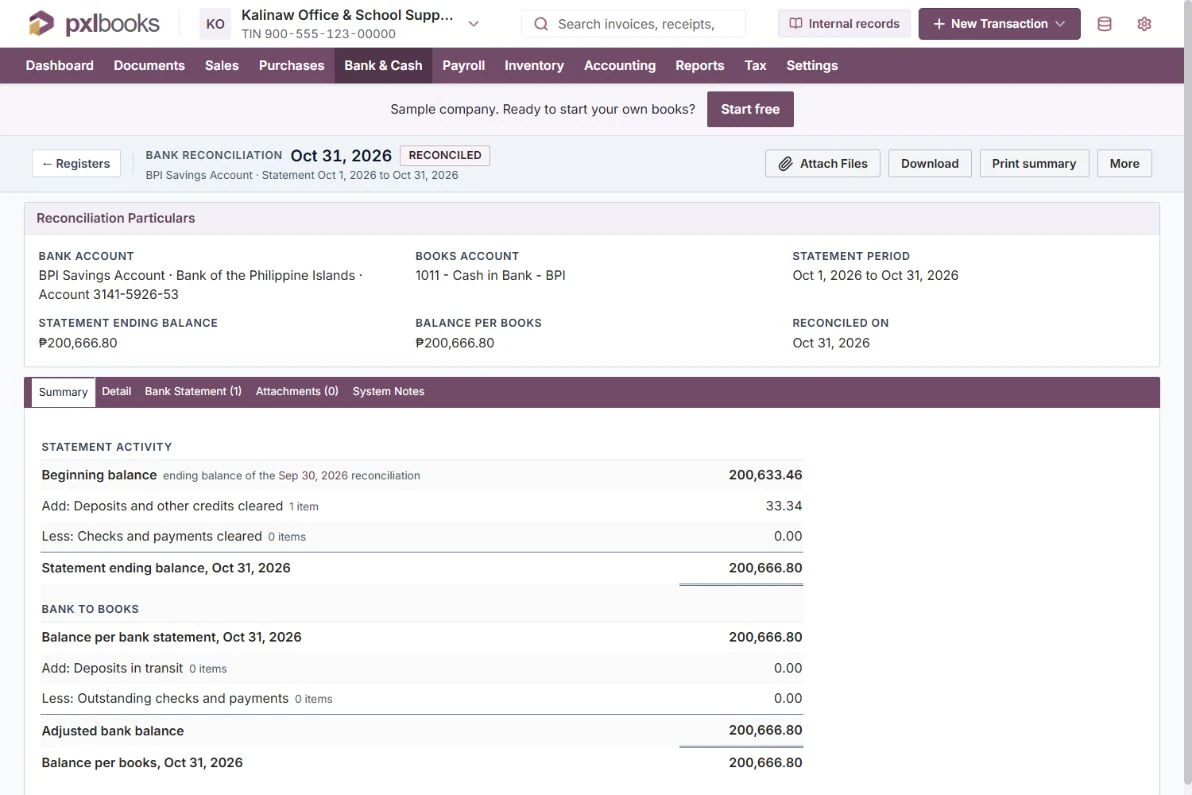
Product screenshot: demo sample records only.
Reconcile one statement
- Open Bank & Cash → Bank Reconciliation. Select a bank linked to a General Ledger account.
- Set the statement period, beginning balance where required, and ending balance.
- Import the file and map dates, descriptions, debits, credits and running balances. Check withdrawal signs.
- Review suggested matches and investigate missing deposits, duplicates, bank charges and uncleared checks.
- Record legitimate bank-only items with the correct accounts and tax treatment. Do not post a balancing expense without evidence.
- Review the difference and complete the reconciliation. Keep the summary and detail PDF or Excel with the statement. Undo a completed reconciliation only after reviewing the period and permissions.
Worked reconciliation
The ledger has ₱50,000; the statement has ₱48,000. A ₱5,000 deposit is in transit and a ₱3,000 issued check is outstanding: ₱48,000 + ₱5,000 − ₱3,000 = ₱50,000. Document these timing items; neither is a new sale or expense.
Bank rules suggest, you review
Under Bank & Cash → Bank Rules, define recurring description matches and proposed accounting treatment. Preview matching lines before posting. A fee rule should not classify a supplier payment just because its description contains the same word.
Questions
Does PXL Books connect directly to every bank?
This workflow uses statement-file import. Do not assume a live bank feed is available.
Why is there a running-balance break?
Check missing rows, duplicates, reversed signs and the beginning balance. Fix the import rather than adjusting the ledger without evidence.
Can I export the reconciliation?
Yes. Use the Download options for the summary and supporting detail.
Should I delete an outstanding check?
It may be a valid timing difference. Investigate its status before recording a cancellation or correction.
Continue
Bank features · Month-end close · Try the demo
Last checked against product source: November 20, 2026. Examples are illustrative; review your own records before posting or filing.