
Purchases and payables
Keep supplier bills, payments, withholding, and certificates connected.
On this page
Screenshot: demo sample records only.
This guide covers 8 features. All three planned plans include these features where applicable. Turn on the modules you need in Settings; access depends on your role and the business’s setup. See all 89 features and Pricing & Complete Features.
Purchase orders and receiving reports
In plain English: Compare supplier bills with the order and goods received using three-way match warnings.
Where to find it: Purchases → Purchase Orders, Receiving Reports, and Supplier Bills.
How to use it: Create an order, record the goods received, and link the supplier bill. Review quantity or amount differences; matching warns about discrepancies rather than automatically refusing the bill.
Supplier bills with line-level tax
In plain English: Record VAT, expanded withholding, and final withholding on the relevant bill lines.
Where to find it: Purchases → Supplier Bills.
How to use it: Enter the supplier’s invoice, expense or stock accounts, tax treatment, and withholding codes. Review the bill total and net payable before posting.
Disbursements and supplier advances
In plain English: Pay bills and apply amounts paid to suppliers in advance.
Where to find it: Purchases → Disbursements and Supplier Bills.
How to use it: Record a payment against a bill or as an advance for the supplier. Apply the advance to the bill it covers and check the remaining payable and available advance.
Purchase debit memos
In plain English: Record supplier returns or adjustments against purchases and payables.
Where to find it: Open the posted bill, then More → Debit Memo. The Debit Memos list shows the memos issued.
How to use it: An owner or accountant issues a debit memo from the bill it adjusts. Enter the date, the memo number if you issued one, and the reason, then pick the bill lines and the amounts or quantities to debit. Review the account, stock, and tax effects before posting.
Employee expense claims
In plain English: Record business expenses paid personally by an employee and their reimbursement.
Where to find it: Expense Claims.
How to use it: Enter the employee, expense lines, and supporting supplier details. Review and post the claim, then record reimbursement. Input VAT is claimed only on a VAT receipt that shows the supplier’s TIN and the business’s name and TIN; tick that on the line. Any other receipt is expensed in full.
Payables and A/P aging
In plain English: See unpaid supplier bills and how long they have been outstanding, so you can plan follow-up and payments.
Accounting detail: See supplier balances and unpaid bills by age.
Where to find it: Suppliers and A/P Aging.
How to use it: Choose the reporting date and supplier filters. Open the underlying bills and payments, and investigate control-account differences or unapplied advances before scheduling payments.
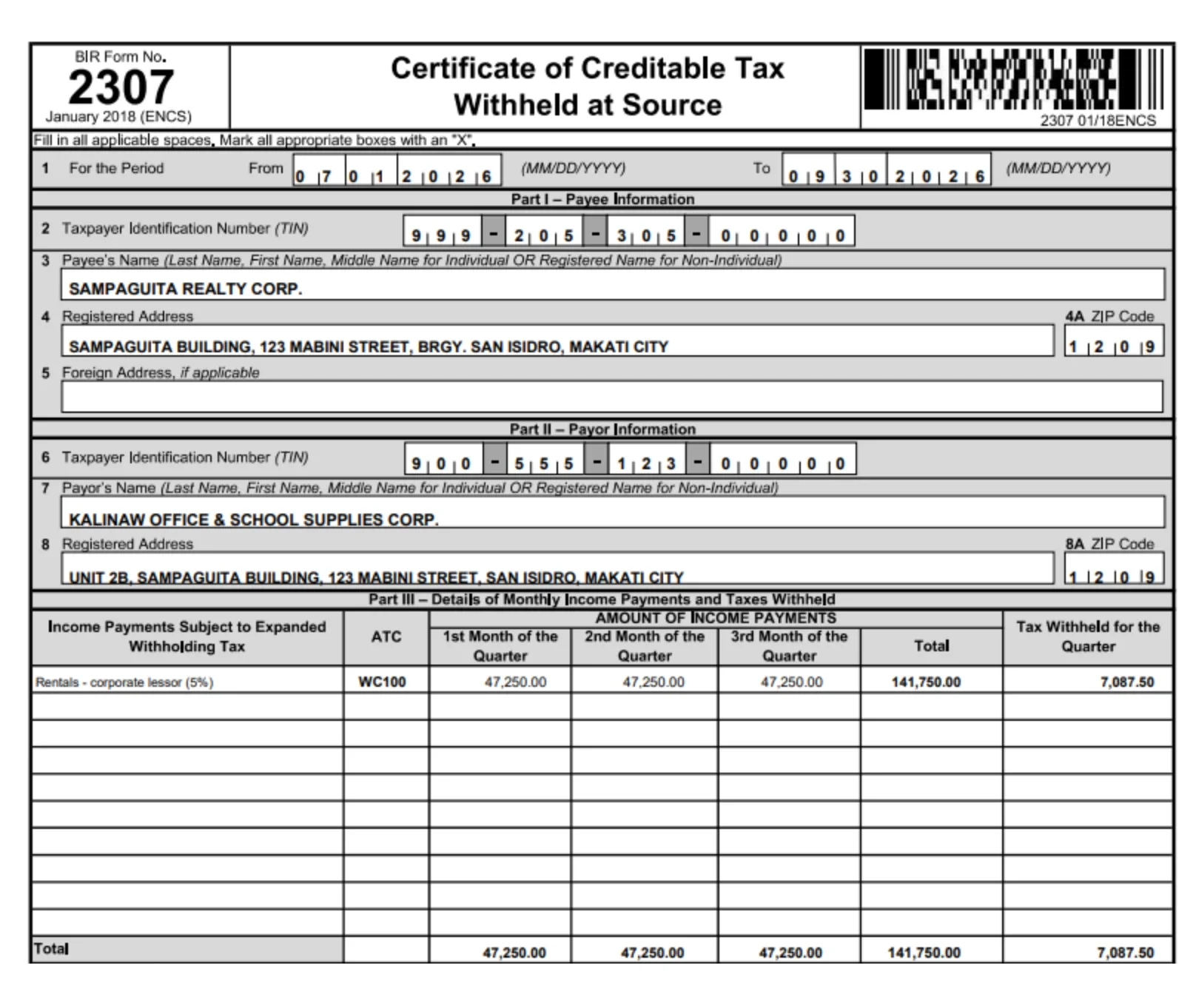
Single and multi-bill Form 2307 PDFs
In plain English: Prepare a supplier’s certificate from posted bills, with an optional signature image.
Where to find it: Purchases → Supplier Bills → Generate BIR 2307.
How to use it: Select a bill or multiple bills and review the supplier, quarter, ATC, and monthly amounts. Preview or download the PDF; drafts are excluded until posted.
Form 2306 final tax certificates
In plain English: Prepare certificates of final tax withheld from the recorded withholding data.
Where to find it: Tax → Withholding Tax → Final → Certificates Issued (2306).
How to use it: Choose the period and payee, check the payor and payee details and tax amounts, then prepare the certificate for review and signing.
Review before you rely on the result
Check the source documents, settings, reporting period, and any required approval. Tax returns and financial statements need review by you or your accountant. PXL Books prepares records and supporting files; it does not file or pay taxes.
Related
Last checked: November 20, 2026.